
Process Canvas

Visualize Your Process. Deliver Continuously.

Modern software design and delivery

  • When Work Feels Busy but Nothing Really Moves Forward

    Have you ever ended a long day feeling exhausted, yet unsure what was actually accomplished?

    Urgent tasks keep popping up because someone forgot to follow up, or a message never reached the right person. Deadlines are missed, but when you try to investigate, no one can clearly tell where the delay happened. Everyone seems busy, yet the overall progress feels slow, messy, and out of control.

    For many SME owners and middle-level managers, this isn’t an occasional problem. It’s the daily scenario at work.

    The True Cost of Unstructured Workflows

    In many organisations, the real bottleneck isn’t people’s attitude or capability. It’s the lack of a clearly defined and consistently followed process.

    Different teams use different tools. Some rely on WhatsApp, some on email, some on spreadsheets, and others on verbal updates. Meetings are spent debating how to do the work or who should do it, instead of actually moving things forward. Managers are forced to micromanage just to keep track of progress and ensure nothing falls through the cracks.

    Even worse, critical knowledge often lives only in someone’s head:

    • Why was a decision made?
    • How does a particular client prefer things done?
    • What exceptions were agreed on previously?

    When a key employee resigns or goes on medical leave, they don’t just leave their role behind; they take the “operating system” of the department with them.

    The consequence? Teams scrolling endlessly through old messages, emails, and files just to reconstruct what happened before. Time, energy, and morale slowly drain away.

    Many companies don’t realise how much time and money are quietly wasted every single day because of unorganised processes.

    “We Just Need a Tool”… Or Do We?

    At this point, many leaders feel stuck.

    You want better visibility into what’s happening across your operations.
    You want fewer surprises and last-minute emergencies.
    You want to spot inefficiencies early, reduce firefighting, and run a healthier, more predictable business.

    And naturally, you start thinking:
    “Maybe we need a system. Maybe we need software to fix this.”

    But that thought often comes with fear.

    • Custom systems sound complex
    • Digital workflow automation sounds expensive
    • You imagine projects that cost hundreds of thousands, or even millions
    • You worry it will take months of meetings, specifications, and training
    • You fear it will become another burden instead of a solution

    So most companies delay. They tolerate the mess. They tell themselves, “We’ll fix this later.”

    Most Daily Problems Are Process Problems

    Yes, many organisations already have SOPs: Thick files, detailed documents, flowcharts that look good on paper.

    But in reality, people rarely read them, or they read them once and forget. More often, time pressure pushes everyone to “just do it my way because it’s faster.” Over time, the SOP becomes disconnected from actual daily work.

    So the real question isn’t whether you have SOPs.
    The question is: how do we get people to actually follow them without slowing work down? How do we make tasks flow from one person to another without constant chasing? How do we make the process visible, traceable, and easy to follow?

    The Solution: Designing Process Canvas

    Process Canvas is a way to map, manage, and organise your workflow step by step. It clarifies who does what, who has permission, and who approves, while making every action traceable. 

    Think of it as a practical framework to visualise and manage work processes—structured, intuitive, and easy for your team to follow, without overwhelming them. When applied correctly, it can transform how your organisation operates, communicates, and grows.
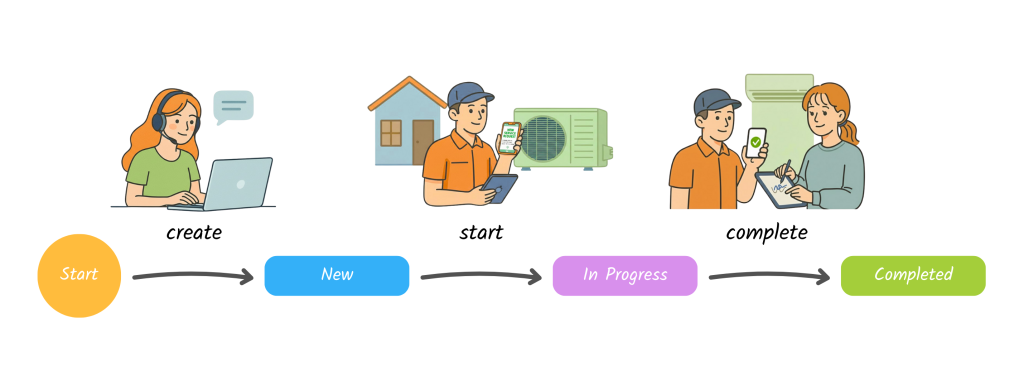
    A well-designed Process Canvas can:

    • Make responsibilities clear
    • Create traceability without extra reporting
    • Reduce dependency on memory and individuals
    • Allow managers to see progress without micromanaging
    • Help teams move faster because things are clearer, not because they work longer hours

    You Don’t Need a Million-Dollar System

    Many people assume that to achieve this, they need to invest hundreds of thousands, or even millions, into highly customised systems. Or they fear that digitalising and automating workflows will be too complex, too time-consuming, and too disruptive to daily operations.

    The truth is, there are simpler ways to organise and manage workflows without custom-building a massive system from scratch. 

    What’s Next ?

    If you’ve ever felt trapped in an unorganised workflow, constantly firefighting, and unsure how to regain control, you’re asking the right questions.

    In the upcoming articles, we’ll continue sharing:

    • Practical guidance to design clearer workflows
    • Mindset shifts to help teams actually follow processes
    • Easy ways to digitalise and manage processes without massive budgets or painful implementation

    Subscribe and follow our blog as we guide you step by step to help you regain clarity and control over your processes. The light at the end of the tunnel may be closer than you think.

    #ProcessCanvas WorkflowDesign #BusinessProcess #ProcessManagement #OperationalEfficiency #ProcessImprovement #DigitalTransformation #Inistate

  • Process Canvas: Information

    | Understanding the Information Section in Process Canvas

    If States are the stations and Activities are the tracks in your process journey, then Information is the ticket that carries the details you need along the way.

    Information fields define what data is captured, referenced, and passed between steps in a process. Done right, they ensure clarity, consistency, and accuracy across your system.

    | Why Information Matters

    Well-designed information fields are the foundation of a reliable process. They:

    • Keep data consistent across different modules
    • Prevent errors and duplication
    • Enable filtering, reporting, and automation
    • Preserve the integrity of historical records

    | Best Practices for Defining Information

    1. Consistent Naming Conventions

    Use the same field names across all modules.

    ✅ Example: If you use Contact No. in the Customer module, use the same name in Job Order or Contract modules.

    ❌ Avoid: Mixing variations like Telephone No., Telephone Number, Contact Number.

    2. Capitalization

    Use capital letters for the first letter of each word in field names.

    • Recommended: Customer Name, Approval Date, Unit Price
    • Flexible: Adjust to customer preferences, especially with abbreviations (e.g., GST, SST).

    3. Avoid Abbreviations (Unless Common)

    Only use abbreviations that are widely recognized and unambiguous.

    ✅ Acceptable: GST, SST
    ❌ Avoid: CN, U/P (unless requested, in which case use as a label, not the field name).

    4. Avoid Symbols in Field Names

    Special characters can cause issues in reporting or automation.

    ❌ Don’t use: U/P
    ✅ Use: Unit Price (you can display “U/P” as the label if the customer insists).

    5. Avoid Reserved or Generic System Field Names

    Never use system defaults like date as custom fields — this may cause conflicts.

    | Rule of Consistency for Historical Data

    Once a document is created, the data it contains is frozen in time. This is called non-destructive updates.

    • Example: If an invoice is issued to A Company and later the company changes its name to B Company, the original invoice will still show A Company.

    This protects:

    • Accuracy – invoices remain true to the original transaction
    • Compliance – no risk of altering past records
    • Audits – historical data is preserved exactly as it was

    Controlled Updates (Optional)

    In some cases, customers may prefer updates to propagate. This can be configured with rules, such as:

    • Only records in the Open state can update automatically if source data changes.

    | Final Thought

    Information fields are more than just labels on a form — they are the building blocks of clarity and consistency in your process canvas.

    By applying consistent naming, choosing the right data type, and respecting the rules of historical data, you ensure your system remains both user-friendly today and auditable years from now.

    Think of information as the ticket that carries your process forward — clear, consistent, and reliable.

  • Process Canvas: Activity

    Understanding the Activity Section in Process Canvas

    If States represent the stations in your process journey, then Activities are the tracks that connect those stations. An activity moves an item forward, representing the action taken by a user to progress from one state to another.

    What Is an Activity?

    An activity is any action performed by a user (or a system) that changes the state of an item in your process.

    For example:

    • Submit Form – a user initiates the process.
    • Approve Request – a manager reviews and approves.
    • Verify Payment – an admin checks a financial transaction.
    • Close Case – the process reaches its conclusion.

    Each activity:

    1. Connects one state to another
    2. Is performed by a specific role or group
    3. Requires or generates information

    How to Name an Activity

    Since an activity represents an action, always use verbs in the naming. This makes it clear that something is being done.

    Examples:

    • Submit Report
    • Approve Claim
    • Verify Payment
    • Reject Application

    👉 Tip: Think of activities as commands — they should be easy for the user to recognize as the action they are supposed to take.

    Breaking Down an Activity

    When defining an activity, consider these elements:

    • Who performs it?
      The role or group responsible (e.g., Admin, Manager, Customer).
    • Why is it done?
      The objective or business purpose (e.g., To confirm a payment is valid).
    • When does it happen?
      The trigger or condition (e.g., After receiving payment proof).
    • What information is needed?
      Inputs required to perform the action (e.g., Invoice number, bank receipt).
    • What information is created?
      Outputs or updates generated (e.g., Payment verification status).

    Example: Verify Payment

    • Who: Admin
    • Why: Confirm payment before closing the case
    • When: After receiving payment proof
    • Information Needed: Invoice number, bank receipt
    • Information Created: Payment verification status
    • Relation to Objective: Ensures the financial transaction is valid

    Tips for Configuring Activities

    When adding activities to your process canvas:

    • Name with verbs to make the action clear.
    • ✅ Ask: What’s the objective of this activity?
    • ✅ Define who is responsible for performing it.
    • ✅ Clarify when it should take place in the process.
    • ✅ Identify what information is needed and what information is produced.

    Why Activities Matter

    Activities bring your process to life. Without them, states remain disconnected checkpoints. By carefully designing activities, you ensure:

    • Clarity – users know exactly what action to take.
    • Accountability – the right role is assigned to the right task.
    • Traceability – inputs and outputs are well-documented.
    • Flow – items move smoothly between states without confusion.

    Final Thought

    If states are the “where” in your process, then activities are the “how.” Together, they create a clear, actionable workflow.

    When designing activities, think like this: What action moves my process forward, who does it, and what does it achieve? If you can answer that, you’ve built a solid activity.

  • Process Canvas: State

    Understanding the State Section in Process Canvas

    When designing a process, one of the first and most important concepts to grasp is the State. A state represents where an item currently is in the journey — much like a station on a train route. It helps everyone involved know the current status, the responsible party, and what should happen next.

    What Is a State?

    A state typically marks a milestone in your process. Examples include:

    • Submitted – a form has been sent in.
    • Approved – a manager has given the green light.
    • Completed – all tasks are finished.

    States can also indicate who is responsible at that point in time:

    • With Procurement – the purchasing team is reviewing.
    • Waiting for Customer Response – action is expected from the customer.

    In other words, a state tells you:

    1. Where the process currently stands
    2. Who is responsible
    3. What’s supposed to happen next

    How to Name a State

    Clear, consistent naming is crucial. A state can usually be expressed in two styles:

    1. Pending action – the next step is waiting to happen.
      • Examples: Pending Payment, Pending Manager Approval, Waiting for Customer Feedback
    2. Action completed – something has already been done.
      • Examples: Invoiced, Service Done, QC Completed

    👉 Tip: Be consistent. Decide whether your team prefers “Pending…” vs. “… Done” and apply it across the system.

    Tips for Configuring States

    When setting up states in your process, consider these guidelines:

    • Use adjectives or short phrases that are easy to understand (Pending, Completed, Verified).
    • Ensure that the name reflects either an achievement (QC Done) or a next action required (Pending QC).
    • Use states to mark key milestones — they should represent meaningful points in the process, not every small step.
    • If helpful, make the state indicate the responsible group or role, such as Pending Manager Review.

    The Train Journey Analogy

    Think of your process like a train journey:

    • States are train stations – they represent the stops along the journey.
    • Activities are the tracks – they connect the stations and move the item forward.
    • Fields are tickets – they carry the information needed at each step.

    For example, a document might move through these stations:

    • PendingSubmittedApprovedCompleted

    Each state is clear, each transition is simple, and the entire journey makes sense to both business users and technical staff.

    Why States Matter

    Defining states well brings:

    • Clarity – everyone knows the current stage of the process.
    • Accountability – responsibilities are clearly indicated.
    • Consistency – the same language and structure applies across the system.
    • Efficiency – fewer errors and less back-and-forth communication.

    Final Thought

    A well-designed set of states forms the backbone of your process canvas. By naming states clearly, keeping them consistent, and treating them as meaningful milestones, you create a system that is intuitive, maintainable, and user-friendly.

    Think of it this way: if your process is the journey, states are the stations where everyone knows exactly where they are and what comes next.

  • Continuous Software Design and Delivery

    Why Modern Software Needs a Continuous Design Approach

    The way we design and build software has changed more in the past decade than in the fifty years before it. Business cycles move faster, customer expectations are higher, and technology itself evolves daily. In this new reality, the traditional way of creating software—big upfront plans, long development cycles, and rigid delivery—just doesn’t keep up.

    Yesterday’s Model: Slow and Rigid

    In the past, software was built like constructing a skyscraper. First came heavy planning, then blueprints, and only after months or even years did something usable appear. For businesses, this meant living with two painful realities:

    • Delayed feedback: By the time a product was ready, customer needs had already shifted.
    • High cost of change: Any adjustment mid-project required tearing down and rebuilding major parts of the system.

    The result? Software that was outdated on arrival, frustrating both for users and the businesses that paid for it.

    Today’s Reality: Fast, Dynamic, and Unpredictable

    Modern businesses no longer have the luxury of static systems. A marketing team wants to run new campaigns weekly. Regulations shift overnight. Customer journeys change with each new platform or competitor. Software has to keep up, adapting not yearly or monthly, but continuously.

    This environment calls for continuous design and development—a process that treats software as a living system rather than a finished product. Instead of designing once and locking it in, teams design, test, and refine in short cycles, always keeping real users in the loop.

    Why the Process Canvas Fits Today

    The Process Canvas embodies this modern approach. Instead of overwhelming stakeholders with technical details, it captures business logic in a simple, visual way. Here’s why it matters now more than ever:

    1. Clarity Across Teams
      Business managers, analysts, and developers can all work from the same “canvas,” ensuring alignment without translation errors.
    2. Built for Change
      Because processes are broken into states, activities, and information, small updates can be made quickly without disrupting the whole system.
    3. Continuous Delivery
      Ideas move from conversation to design to working software in a much shorter cycle. That means faster experiments, quicker learning, and less wasted investment.
    4. Accessibility Beyond IT
      Non-technical team members can see and even influence how systems work, instead of waiting on long technical backlogs.

    The Shift That Matters

    The biggest change today isn’t just technological—it’s cultural. Businesses expect to respond immediately, customers expect personalization instantly, and teams expect tools they can shape themselves. The Process Canvas is not just a framework for software design—it’s a mindset for continuous evolution.

    In a world that doesn’t stop changing, software can’t stand still. And that’s why a modern, continuous approach—simple, collaborative, and adaptable—is exactly what today demands.

  • Process Canvas

    The Process Canvas (PC) is a visual tool that helps individuals and organizations map out workflows and business processes. Much like the Business Model Canvas (BMC) transformed the way businesses describe their models, the PC provides a structured way to illustrate, analyze, and improve processes.

    Why Use the Process Canvas?

    The PC offers several practical benefits:

    • Clarity – Provides a clear overview of processes at a glance.
    • Communication – Makes it easier for teams to share ideas and align understanding.
    • Brainstorming – Supports collaborative workshops and process ideation.
    • Requirements Gathering – Bridges the gap between business needs and system design.

    It’s not just a drawing tool—it’s a thinking framework that simplifies complexity.

    When to Use the Process Canvas?

    The PC can be applied across a wide range of scenarios, including:

    • 📌 Workflow planning – mapping out step-by-step activities.
    • 📌 Process documentation – capturing how things are done today.
    • 📌 System development – accelerating the requirements and design phase.
    • 📌 Operational improvement – identifying inefficiencies and redesigning workflows.

    Wherever people need to understand and improve how work gets done, the PC has a role.

    PC for Business and Technical Users

    One of the strengths of the PC is its ability to act as a common language:

    • 💼 For business professionals – it builds directly on familiar frameworks like the Business Model Canvas (BMC), helping translate strategy into actionable workflows.
    • 💻 For technical professionals – it simplifies the early phases of the Software Development Life Cycle (SDLC), making requirement gathering and analysis more efficient.

    This dual appeal makes the PC an excellent collaboration tool, bridging conversations between business and technology stakeholders.

    PC and the System Development Lifecycle
    raditionally, the SDLC follows these stages:

    Requirements → Design → Implementation → Testing → Deployment → Maintenance

    With the PC, the requirements phase can be accelerated. By mapping processes visually first, teams reduce misunderstandings and shorten the time needed to translate ideas into working systems.

    In practice, a PC can act as a living blueprint, guiding the journey from concept → design → execution.

    More Than a Tool: A Mindset

    The real power of the PC lies not just in its format, but in the mindset it encourages:

    • 🌱 Accessibility over accuracy – anyone can start sketching, even without technical expertise.
    • 🤝 Collaboration over silos – business and technical teams work together on the same canvas.
    • 🚀 Growth over stagnation – processes evolve as the business evolves.

    By adopting the PC, organizations don’t just document processes—they create a culture of continuous learning and improvement.

    👉 The Process Canvas (PC) is more than a diagramming tool. It’s a bridge between strategy and execution, between business and technology, and between today’s operations and tomorrow’s innovations.

  • Origin

    Every great software idea begins with a question: How can we design systems that are both simple to understand and sustainable to maintain?

    Traditional tools like the Business Model Canvas (BMC) or Business Process Model and Notation (BPMN) have helped businesses map out strategies and processes, but when it comes to modeling systems, these methods often feel too complex, costly, or disconnected from real software design. What was missing was a framework that could bridge business understanding with technical execution—something that could empower both technical and non-technical people to collaborate.

    This is where the concept of a canvas for software design emerged. Inspired by the clarity of the BMC and the rigor of the Finite State Machine (FSM) model, the idea evolved into a visual and structured way to represent workflows. Instead of being buried in technical jargon, processes could be expressed in terms of states (where you are), activities (what moves you forward), and information (what details you need).

    Over time, this canvas grew into a schema—a human-readable format that makes business logic transparent, consistent, and executable. It became more than a sketching tool; it became a bridge between conversation and code, between intention and implementation.

    By lowering the barrier to software creation and making systems easier to design, build, and maintain, this approach unlocks a new way of working. It enables business owners, managers, and analysts to move from ideas to functioning software without being overwhelmed by complexity.

    This blog introduces that journey: how a simple canvas concept, grounded in FSM theory, evolved into a practical schema for modern software design and delivery. It is a story of rethinking not just how we build software, but how we bring clarity and accessibility to the people who need it most.

  • Road Map

    Welcome to Process Canvas.

    1. Introduction
    2. Canvas
    3. Pattern
      • List
      • Workflow
      • Approval
      • Business Documents
      • Transaction
    4. Design
    5. Strategy
    6. Process
      • Discovery
      • Design
      • Development
      • Testing
      • Release
      • Maintenance